Create a Developer Account to get started

Welcome to Malipo API Documentation
Provide your customers with the option to pay by card or mobile money, ensuring a seamless checkout experience. Collect payment information quickly and securely.
Create a Developer Account to get started
The Malipo Payments API is a payment system aggregation platform designed to allow merchants to accept payments from customers using a variety of payment providers through a single access point. The API Gateway offered by Malipo consolidates all payment services, enabling merchants to integrate seamlessly with different payment methods without the need for bilateral integrations or specialized infrastructure like VPN connections.
Key features of the Malipo Payments API include:
This API streamlines the payment process for businesses, making it easier to manage and support diverse payment methods in a centralized manner.

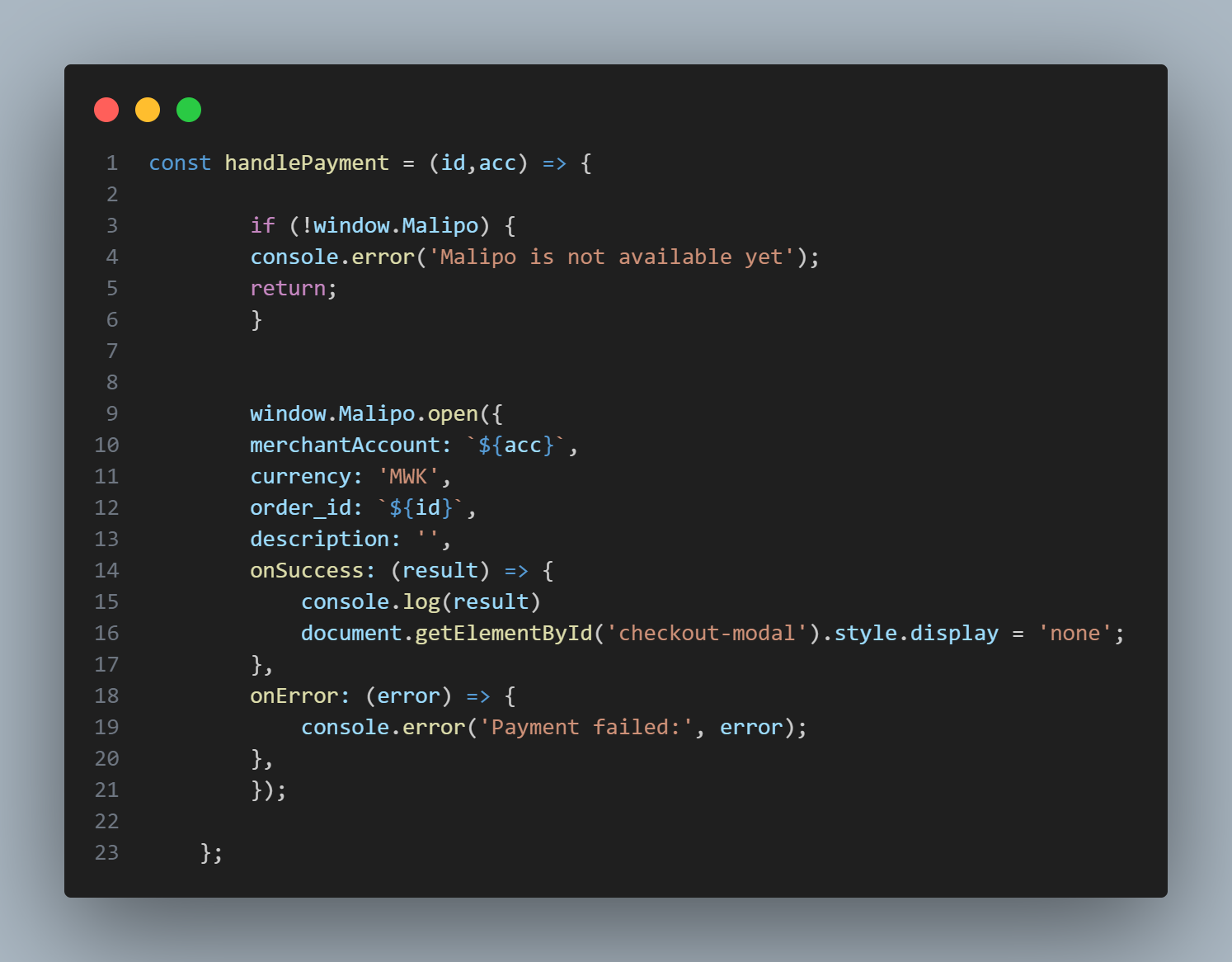
The parameter to pass in the open function
merchantAccount(string, required): The unique identifier for the merchant account.currency (string, required): The default is MWK.amount(Float, optional): The amount to be paid.order_id(string, required): The order id for the purchase.description(string, optional): The order description.
    window.Malipo.open(
    {
        "merchantAccount": "111903104",
        "currency": "MWK",
        "amount": 50
        "order_id": "131",
        "description": "Subscription payment",
        "onSuccess": (result) => {
            document.getElementById('checkout-modal').style.display = 'none';
        },
        "onError": (error) => {
            console.error('Payment failed:', error);
        },
     });
This endpoint allows you to make a POST request to initiate a payment request.
merchantTrxId(string, required): The unique identifier for the merchant transaction.customerPhone (string, required): The phone number of the customer.bankId(integer, required): The ID of the bank.amount(integer, required): The amount of the payment.message(string): A message related to the payment request.data(object):transaction_id(string): The Unique Id of the transaction in MobiPay system.merchant_trx_id(string): The unique merchant transaction ID.account_number(string): The account number/projectId under which the payment is made.wallet(string): The wallet used for the transaction. Same as customerPhone number.amount(integer): The amount of the transaction.narration (string): Additional information or description of the transaction.transaction_type_id(integer): The ID of the transaction type.payment_channel_id (integer): The ID of the payment channel used.This is your unique API Key of your project accessible in the MobiPay dashboard.
This is your Project ID also refered to App ID accessible in the MobiPay dashboard.
USSD push Payment example
    curl --location 'https://app.malipo.mw/api/v1/paymentrequest' \
    --header 'x-api-key: d7372c3d80d565f102cfa2731cd8fc1b' \
    --header 'x-app-id: 456475567' \
    --data '{
          "merchantTrxId": "TEST1119030",
          "customerPhone": "265984940044",
          "bankId": 1,
          "amount": 200
    }
    '
200 Created
    {
        "message": "Payment request prepared.",
        "data": {
          "transaction_id": "IP240328110742",
          "merchant_trx_id": "TEST1119029",
          "account_number": "456475567",
          "wallet": "265984940044",
          "amount": 200,
          "narration": "Invoice Payment",
          "transaction_type_id": 1,
          "payment_channel_id": 1
        }
      }
This HTTP POST request is used to initiate a refund for a specific transaction by providing the transaction ID in the URL. Upon successful execution, the API returns a 200 status with a JSON response containing the status of the refund, the reversal transaction ID, and the customer reference.
The response body includes the following fields:
This endpoint allows users to efficiently process refunds for transactions and retrieve essential information related to the refund operation.
MobiPay Transaction ID
Refund
    curl --location --request POST 'https://app.malipo.mw/api/v1/payment/refund/IP240330134348' \
    --header 'x-app-id: 456475567' \
    --header 'x-api-key: d7372c3d80d565f102cfa2731cd8fc1b'
200 OK
      {
        "status": "success",
        "reversal_trans_id": "RF240409277738",
        "customer_ref": "MP240330.1022.H12828"
      }
This endpoint allows you to execute a withdrawal payment.
merchantTrxId(string, required): The merchant transaction ID.customerPhone (string, required): The user's wallet phone number.bankId(integer, required): The ID of the bank.amount(integer, required): The withdrawal amount.Upon successful execution, the API returns a JSON response with the following structure:
     {
        "message": "string",
        "data": {
            "transaction_id": {
                "merchantTrxId": "string",
                "transaction_id": "string",
                "account_number": "string",
                "customerPhone": "string",
                "bankId": 0,
                "amount": 0,
                "transaction_type_id": 0
            }
        }
    }
message(string): A message indicating the status of the withdrawal request.data(object):The data object containing the transaction details.transaction_id(object): The transaction details.
merchantTrxId(string): The merchant transaction ID.transaction_id(string): The unique transaction ID.account_number(string): The account number for the withdrawal.amount(string): The customer's phone number.customerPhone (integer): The ID of the bank.amount(integer): The withdrawal amount.transaction_type_id (integer): The ID representing the transaction type.Withdrawal Example
    curl --location 'https://app.malipo.mw/api/v1/payments/withdrawal' \
    --header 'x-api-key: 2403e1bee127876f5d2877fb1ede93de' \
    --header 'x-app-id: 10000001' \
    --data '{
          "merchantTrxId": "111903106",
          "customerPhone": "265994791131",
          "bankId": 1,
          "amount": 50
    }
    '
200 Created
      {
        "message": "Customer Payout instruction dispatched!",
        "data": {
          "transaction_id": {
            "merchantTrxId": "111903105",
            "transaction_id": "CP240421356247",
            "account_number": "10000001",
            "customerPhone": "265994791131",
            "bankId": 1,
            "amount": 50,
            "transaction_type_id": 3
          }
        }
      }
The URL endpoint is provided by merchant and is where MobiPay will post a transaction status updated of what transpired when the customer was delivered a payment request.
status
Can either be Completed or Failed.merchant_trx_id Transaction reference originated.transaction_idMobiPay transaction reference.customer_reference Third-Party system transacton ID delivered to he customer for their reference.This request does not expect any response and will not be affected by anything the merchant responds with.
Instant Payment Notification (IPN)/Callback
    curl --location 'https://yourdomain.com/api/callback_url' \
    --data '{
        "status":"Completed",
        "merchant_trx_id":"56527573",
        "transaction_id":"IP0028938",
        "customer_reference":"MP20240612.76368683"
    }'
                     No response body
          This request doesn't return any response body
                            No response body
                This request doesn't return any response body
This endpoint allows you to prepare an invoice which can be paid via the web by making an HTTP POST request to
https://app.malipo.mw/api/v1/invoice/prepare.
merchantTrxId(string, required): The unique identifier (e.g Order number) from the merchant system.amount (number, required, greater than 1): The amount for the invoice.redirect_url (string, required): The URL to redirect after the invoice has been paid for on the web.This is your Project ID also refered to App ID accessible in the MobiPay dashboard.
This is your unique API Key of your project accessible in the MobiPay dashboard.
Example Response
    curl --location 'https://app.malipo.mw/api/v1/invoice/prepare' \
    --header 'x-app-id: 10000001' \
    --header 'x-api-key: 2403e1bee127876f5d2877fb1ede93de' \
    --data '{
            "merchantTrxId": "TEST002999500",
            "amount": 50,
            "redirect_url":"https://example.com/path/to/order0023/product"
    }
    '
200 OK
        {
            "message": "Web Invoice prepared successfully.",
            "projectId": "456475567",
            "amount": 50,
            "currency": "MWK",
            "payment_link": "https://app.malipo.mw/invoices/web/execute/9baa570f-a336"
        }
This endpoint makes an HTTP GET request to retrieve a list of banks from the specified URL. The response will be in JSON format and will include an array of objects, each representing a bank with its id, name, type, and logo URL
Bank list Example
    curl --location 'https://app.malipo.mw/api/v1/banklist' \
    --header 'x-api-key: d7372c3d80d565f102cfa2731cd8fc1b' \
    --header 'x-app-id: 456475567'
200 OK
     [
        {
          "id": 1,
          "name": "Airtel Money",
          "type": "Wallet",
          "logo_url": null
        },
        {
          "id": 2,
          "name": "TNM Mpamba",
          "type": "Wallet",
          "logo_url": null
        }
      ]
This endpoint allows you to retrieve payment details for a specific transaction by providing the transaction ID in the URL.
The response will be in JSON format with a 200 status code. The response includes various details such as application name, app ID, transaction ID, merchant transaction ID, customer reference, payment provider, currency, customer wallet, narration, amount, fee, status, and timestamp.
Add documentation.
Transaction Enquiry Example
    curl --location 'https://app.malipo.mw/api/v1/payment/enquire/CP240326358073' \
    --header 'x-app-id: 456475567' \
    --header 'x-api-key: d7372c3d80d565f102cfa2731cd8fc1b'
200 OK
    {
        "message": "Transaction record found!",
        "data": {
          "application_name": "MobiPay UAT",
          "app_id": "456475567",
          "transId": "CP240326358073",
          "merchant_trx_id": "72522059",
          "customer_ref": "BCQ60B7GLQ",
          "payment_provider": "TNM Mpamba",
          "currency": "MWK",
          "customer_wallet": "265882997445",
          "narration": "Customer Payout",
          "amount": "-60.50",
          "fee": "-2.06",
          "status": "Completed",
          "timestamp": "2024-03-26 12:25:02"
        }
    }
This endpoint retrieves the balance information for the account/application.
    {
        "status": "",
        "data": {
            "balance": "",
            "currency": ""
        }
    }
    curl --location 'https://app.malipo.mw/api/v1/accounts/balance' \
    --header 'x-api-key: 2403e1bee127876f5d2877fb1ede93de' \
    --header 'x-app-id: 10000001'
200 ok